Honest Comparison

Gantivity vs Microsoft Project: planning tool or execution system?

MS Project is a mature, respected planning tool — and for many teams, that's exactly the problem: projects fail in execution, not in planning. Here's a fair look at where each tool wins, so you can decide based on the problem you actually have.

Where Microsoft Project is genuinely strong

Credit first. Microsoft Project has been the default planning tool for a large part of the industry for decades, and it earned that position. Its CPM engine is mature and trusted: dependencies, constraints, resource levelling, cost loading, baselines — the desktop product models plans in depth. Enterprise familiarity is real: planners know it, PMO templates assume it, and it sits naturally in a Microsoft-centric IT environment alongside the rest of the Office stack. If your need is a trained planner authoring and maintaining a plan at a desk, MS Project remains a capable choice.

(For clarity: Microsoft Project is a trademark of Microsoft Corporation. Gantivity is built by DashFlow Solutions and is not affiliated with Microsoft; this comparison is factual and reflects the products' publicly known characteristics.)

Where MS Project falls short for field execution

The gaps appear the day construction starts, because MS Project was designed to author plans, not to run sites:

  • The plan is static between updates. The schedule reflects reality only as often as someone manually updates the file. On most projects that's weekly at best, monthly in practice — and the version stakeholders see is a PDF export that was out of date when it was printed.
  • No field workflow. There is no built-in way for a site engineer to report daily progress against their tasks. Progress arrives by email, chat, or verbally, and someone re-keys it — a lossy, slow pipeline from the work face to the schedule. Compare Gantivity's daily progress report workflow.
  • No prediction, no escalation. MS Project reports variance after you enter it. It does not watch execution signals, flag activities trending late, or escalate an unanswered critical issue. The analysis and the chasing are entirely manual.
  • Specialist dependency. The file lives with one trained operator. When they're on leave, the schedule effectively is too — and every question about it queues behind them. There's no in-channel assistant a site engineer can ask "what's due this week?"
  • No AI. Schedule creation is manual activity entry and logic wiring; reports are manual assembly. The mechanical work that AI now does well is still done by hand.

Gantivity's approach: the schedule as a live system

Gantivity keeps the CPM fundamentals — dependency and calendar-aware scheduling with a Gantt-backed critical path — and rebuilds everything around them for execution. Schedules are generated with AI in Studio from plain-language scope. Site teams file structured daily progress from the work face. Delay prediction flags trending slips while mitigation is cheap. Issues carry severity and auto-escalate when they sit unanswered. Status, risk, and variance reports are AI-generated from live data, and ZAI answers schedule questions in-channel for anyone on the project — no specialist queue. The result is one live system from plan to work face, which is the core of our project controls approach.
Gantivity vs MS Project at a glance

Based on publicly known product characteristics. "Partial" means the capability exists in some form but typically requires add-ons, manual effort, or specific licensing tiers.

CapabilityGantivityMicrosoft Project
AI schedule generationYes — plain-language scope to WBS in StudioNo
Delay predictionYes — from live execution signalsNo — variance visible after manual update
Daily progress from fieldYes — DPR workflow at the work faceNo built-in field workflow
In-channel AI assistantYes — ZAI in project channelsNo
Automated escalationsYes — configurable, with severity and loggingNo
AI reportsYes — status, risk, digest, variance from live dataNo — reports assembled manually
Gantt / CPMYes — dependency & calendar aware, live critical pathYes — mature, deep CPM engine
Learning curveMinutes for field users; PM-friendlySteep — typically needs a trained planner
Pricing modelEarly access now; per-user plans comingPer-user subscription tiers; desktop licences
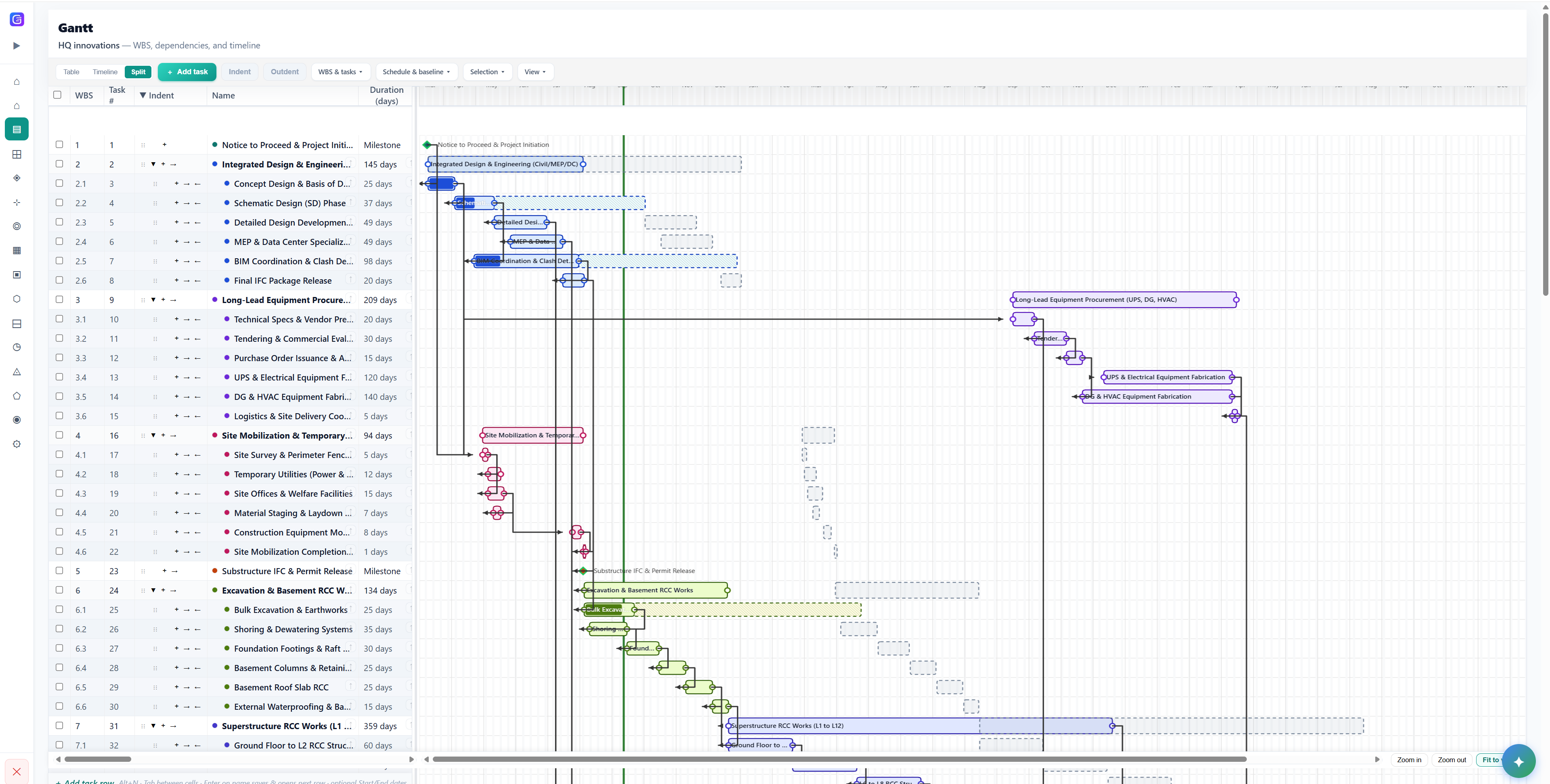
Smart Gantt

The Gantt you know — fed by the site, every day

Dependency and calendar-aware scheduling with live critical path, plus the execution layer: field progress, prediction, and escalation.

  • Critical path recomputed from daily field data
  • Execution signals: on track, behind, blocked
  • Scenario answers without opening a specialist file
Why our Gantt is different →
Gantivity Gantt chart with live critical path as an MS Project alternative

Which should you choose?

Stay with MS Project if your organisation needs deep offline plan authoring by trained planners, extensive resource and cost modelling inside a Microsoft-centric environment, and your execution reporting already works. Migrating a functioning process for its own sake helps nobody.

Consider Gantivity if the schedule keeps drifting from reality: progress lives in chat, the file depends on one person, delays surprise you, and reporting eats days. That's an execution problem, and it's the problem Gantivity was built for — see the full picture in construction project management software, or compare against the other incumbent in Gantivity vs Primavera P6. Plans are on pricing, and more practice guides are on the blog.

Gantivity vs MS Project: common questions

Is Gantivity a replacement for Microsoft Project?
For teams whose real problem is execution — keeping the schedule current, collecting daily progress from site, catching delays early — yes, Gantivity covers the CPM fundamentals and adds the execution layer MS Project lacks. Organisations that only need offline plan authoring inside a Microsoft-centric workflow may reasonably stay with MS Project.
What is Microsoft Project genuinely good at?
MS Project has a mature, trusted CPM engine, decades of enterprise familiarity, deep resource and cost modelling in the desktop product, and natural fit within a Microsoft-centric IT environment. For a trained planner authoring a plan at a desk, it remains a capable tool.
Where does MS Project fall short for construction execution?
The plan is static between updates: there is no built-in daily progress workflow for site teams, no delay prediction, no automated escalation, and no in-channel AI assistant. Progress arrives by email or chat, someone re-keys it into the file, and the schedule everyone sees is a PDF export that is already out of date. The tool also tends to depend on one trained operator, who becomes a bottleneck.
How does Gantivity differ from MS Project day to day?
In Gantivity the schedule is generated with AI from plain-language scope, site engineers file daily progress reports from the work face, delay prediction flags activities trending late, issues auto-escalate when they sit unanswered, and status, risk, and variance reports are AI-generated from live data. Every stakeholder works in the same live system rather than reading exports.
Can we move from MS Project to Gantivity?
Yes. Teams typically bring an existing plan or simply describe the scope in Gantivity Studio, which rebuilds the schedule as a structured WBS with dependencies and calendars. During early access we onboard teams directly and help translate existing programmes. Contact us to plan a migration.
Is Gantivity affiliated with Microsoft?
No. Gantivity is built by DashFlow Solutions and has no affiliation with Microsoft. Microsoft Project is a trademark of Microsoft Corporation, and references to it here are for factual comparison only.

Keep the CPM. Add the execution system.

Bring one live project into early access and run it alongside your current process. The difference shows up in the first week's reports.