From Lagging to Leading Indicators

Project controls software that measures today and predicts next month

Project controls is the feedback system of a project: schedule, progress measurement, risk, reporting, and escalation. Gantivity runs all five pillars on one live schedule — with AI doing the mechanical work that used to make the control cycle monthly instead of daily.

What is project controls?

Project controls is the discipline of keeping a project's time and cost outcomes within plan. It is distinct from project management: the PM decides and directs; project controls measures, forecasts, and warns. On a well-run job the two form a loop — controls tells management where the project is and where it is heading, management acts, controls measures the effect.

The discipline rests on five pillars:

  • Scheduling — building and maintaining a network of activities with dependencies, calendars, and a critical path that actually reflects the delivery strategy.
  • Progress measurement — capturing what was actually done, at the activity level, at a cadence fast enough to matter.
  • Risk management — identifying what threatens the plan, quantifying the exposure, and tracking mitigation.
  • Performance reporting — turning schedule and progress data into honest, current answers for owners, leadership, and clients.
  • Change and escalation management — a governed path for issues, changes, and decisions, so problems move up rather than sideways.

Most organisations have all five on paper. The failure is in the plumbing: each pillar runs on its own tool and its own cadence, and the reconciliation between them is manual. That is why classical project controls is a lagging discipline — by the time variance is measured, reported, and discussed, the window for cheap correction has closed.

How Gantivity implements each pillar

Scheduling: AI generation, continuous critical path

Gantivity Studio generates the schedule from plain-language scope — WBS, dependencies, durations, calendars — and computes a Gantt-backed critical path. Because generation is cheap, every package and recovery plan gets a real network, not just the main contract programme. Details on the AI construction scheduling page.

Progress measurement: daily, structured, from the work face

The Daily Progress workflow captures notes, percent progress, and time per task, from the site engineer's phone, with full history. Measurement stops being a monthly reconstruction and becomes a daily byproduct of the work — which is the single change that makes every other pillar leading instead of lagging.

Risk: delay prediction from execution signals

Execution signals classify every task as on track, behind, or blocked, and the delay-prediction layer compares actual performance against planned rates to flag activities and milestones trending late — before the float is gone. Risk stops being a static register reviewed monthly and becomes a live overlay on the schedule itself.

Reporting: generated, not assembled

Status reports, risk summaries, weekly digests, and schedule-variance narratives are generated by AI from the live schedule on demand. ZAI, the in-channel copilot, answers ad-hoc questions — due this week, tasks with issues, channel summaries — in seconds. The controls team reviews and interprets; nobody spends two days a month formatting.

Change and escalation: governed by default

The issues register carries priority and severity, and configurable auto-escalation moves unanswered critical items up the chain automatically, with a log of who was notified and when. Project controls messaging (PCM) keeps structured nudges aligned to pending work, so the governance runs in the same place the conversation does.
Control Tower

The controls view leadership actually reads

Dashboards and a multi-project inbox aggregate schedule health, risks, escalations, and progress across the portfolio — current every morning.

  • Execution signals across projects and phases
  • Escalations, assignments, and mentions in one inbox
  • Views tuned for controls teams, PMs, and executives
See all capabilities →
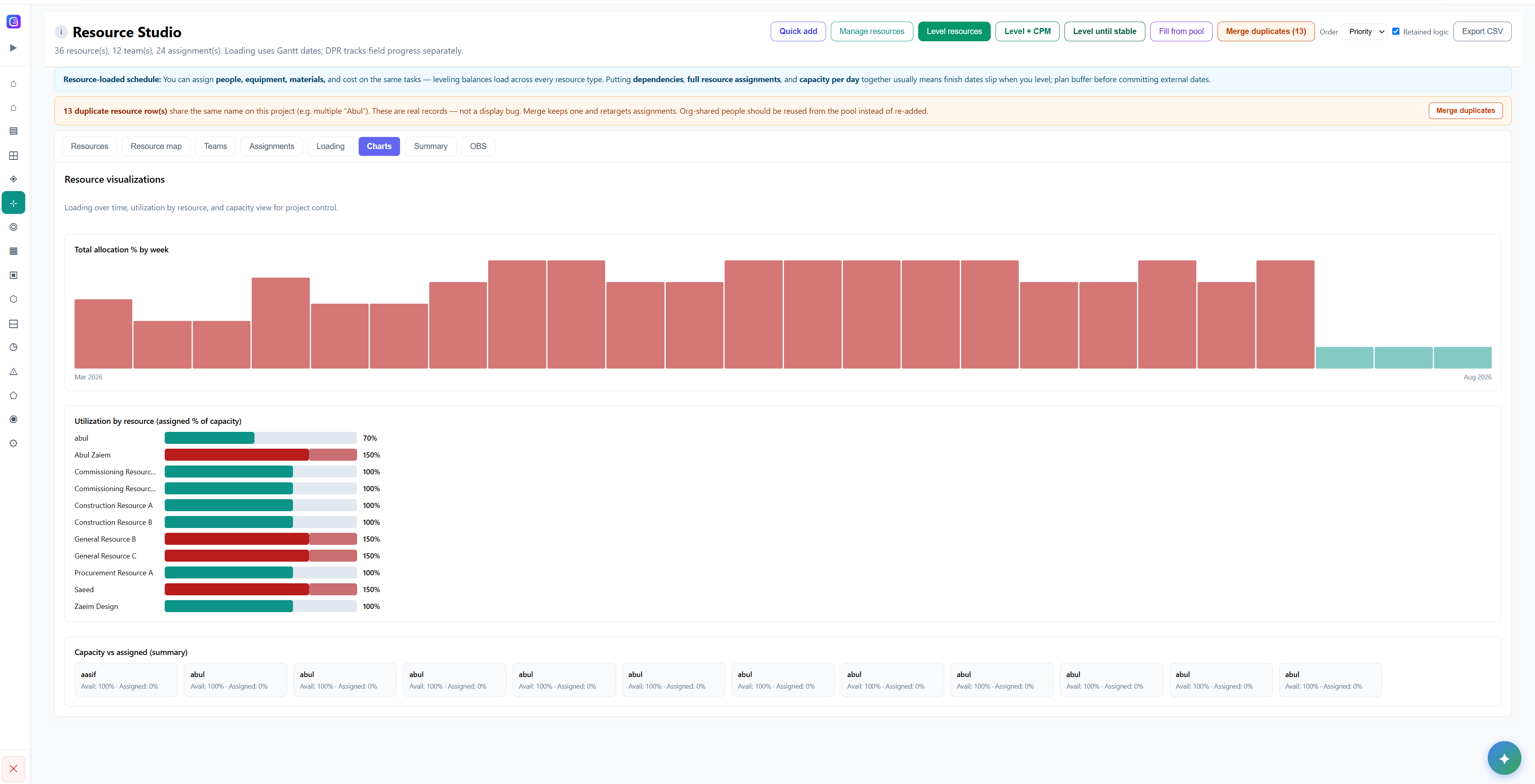
Gantivity resource loading against the live programme WBS

Why AI moves project controls from lagging to leading

The control cycle was monthly because data collection was manual. Change the economics of the loop and the discipline changes with it.

Measurement becomes continuous

Daily, structured progress from the field replaces the monthly reconstruction. Variance is visible the day it starts, not the month it's reported.

Analysis becomes predictive

Delay prediction reads trends in execution signals and warns while mitigation is still cheap — leading indicators instead of a post-mortem.

Response becomes automatic

Auto-escalation and structured nudges close the loop between detection and action. A warning nobody acts on is not control.

Who runs project controls on Gantivity

Enterprise PMOs standardise the control cycle across a portfolio while each project keeps its own schedule and channels. General contractors get a working controls function without a specialist team — the schedule, measurement, prediction, and escalation come with the platform. Owners get independent, current visibility instead of a monthly narrative. For the full delivery context, see construction project management software; for how the schedule view itself works, see Gantt chart software.

Teams migrating from specialist planning tools should read Gantivity vs Microsoft Project and Gantivity vs Primavera P6 — including our honest take on where those tools remain the right choice. Plans are on the pricing page, and the blog covers project controls practice in depth. To bring a project into the early access program, contact us.

Project controls: common questions

What is project controls?
Project controls is the discipline of keeping a project's time and cost outcomes within plan: building and maintaining the schedule, measuring progress against it, identifying and managing risk, reporting performance to stakeholders, and managing changes and escalations. It is the feedback system of a project — the function that tells you where you are, where you are heading, and what to do about it.
What is project controls software?
Project controls software implements those pillars in one system: a CPM schedule engine, structured progress capture from the field, risk and variance analysis, automated reporting, and a managed register for issues, changes, and escalations. The defining test is whether the pillars are connected — progress data should update the schedule, feed the risk picture, and drive the reports without manual reconciliation.
How does Gantivity implement project controls?
Gantivity connects all five pillars to one live schedule: AI schedule generation in Studio, daily progress reports from the work face, delay prediction from execution signals, AI-generated status, risk, digest, and variance reports, and an issues register with priority, severity, and configurable auto-escalation. Dashboards and a multi-project inbox give PMOs a portfolio-level control tower.
What does AI change about project controls?
Traditional project controls is a lagging discipline: variance is measured after it occurs, in monthly cycles limited by manual data collection. AI changes the economics of the loop — progress arrives daily and structured, delay prediction flags trends before they consume float, reports are generated instead of assembled, and escalations fire automatically. The controls function shifts from documenting slippage to preventing it.
Do we need a dedicated project controls team to use Gantivity?
No. Large organisations with established project controls teams use Gantivity to shorten their control cycle, while smaller contractors get a working controls system — schedule, progress measurement, risk flags, reports, and escalation — without hiring specialists. The AI does the mechanical work either way.
Can Gantivity run project controls across a portfolio?
Yes. Dashboards and the multi-project inbox aggregate escalations, assignments, and mentions across projects, and execution signals make it clear which projects need attention. PMOs use this as a control tower while each project team works in its own schedule, channels, and daily progress workflow.

Run controls on live data, not last month's

Early access is open for construction, infrastructure, and enterprise teams. Bring one project and shorten your control cycle from monthly to daily.