One Platform, Plan to Work Face

Construction project management software that runs the whole job, not just the plan

Scheduling, daily site reporting, issues and escalation, and project communication — connected to one live schedule instead of scattered across five tools. Here's what to look for in construction PM software, and how Gantivity approaches it.

What to look for in construction project management software

Construction projects fail in the gaps between systems. The schedule lives in a planning tool, daily progress lives in WhatsApp and paper diaries, issues live in a spreadsheet nobody owns, and decisions live in someone's inbox. Each tool works; the project still drifts, because no single system knows what is actually happening.

When evaluating construction PM software, the question is not "does it have features?" — everything has features. The question is whether the platform closes the loop between plan and reality. Four capabilities matter most:

  • A real schedule engine. Dependencies, working calendars, and critical path — not a task list with dates. If the tool can't tell you which slip moves the completion date, it can't manage a construction project. See our Gantt chart software page for what a serious schedule view requires.
  • Field reporting the site will actually do. Progress capture has to take minutes from a phone at the work face, or it degrades into end-of-week fiction. This is the case for structured daily progress report software over paper and chat.
  • Issues with teeth. An issues register with priority, severity, and ownership — plus escalation that fires automatically when a critical item sits unanswered, so problems can't hide in a thread.
  • Reporting without a reporting day. Owners, leadership, and clients need current answers. If producing the weekly report takes a day of copy-paste, the report is already describing last week.

These four are the foundation of project controls. A fifth capability — AI — is the multiplier: it removes the labour that makes teams skip the first four.

How Gantivity covers planning, execution, field reporting, and communication

Planning: AI schedule generation in Studio

Describe your scope in plain language and Gantivity Studio builds the work breakdown structure — tasks, dependencies, durations, calendars — and computes the critical path. You iterate with the AI, stress-test feasibility, then baseline. A credible draft schedule takes minutes, which means even fast-moving packages and recovery plans get a real programme. Full detail on our AI construction scheduling page.

Execution: signals, prediction, escalation

During delivery, execution signals mark every task as on track, behind, or blocked. Delay prediction compares field performance against the plan and flags milestones trending late — weeks before a monthly update would catch them. The issues register carries priority and severity, and configurable auto-escalation pushes unanswered critical items up the chain automatically, with a log of who was notified and when.

Field reporting: the Daily Progress workflow

Site engineers update their tasks daily — notes, percent progress, time — and raise issues directly from the work face. Every update writes back to the schedule, building a timestamped history per task. That history is the raw material for delay prediction, variance analysis, and defensible answers when the delay-responsibility conversation happens.

Communication: PCM and the ZAI copilot

Project controls messaging (PCM) keeps conversation attached to the work: channels and update streams with structured nudges aligned to pending tasks. ZAI, the in-channel copilot, answers "what's due this week?", "which tasks have issues?", and "summarise this channel" instantly — and helps draft escalations without leaving the conversation. Dashboards and a multi-project inbox give PMs and leadership a control-tower view across everything.
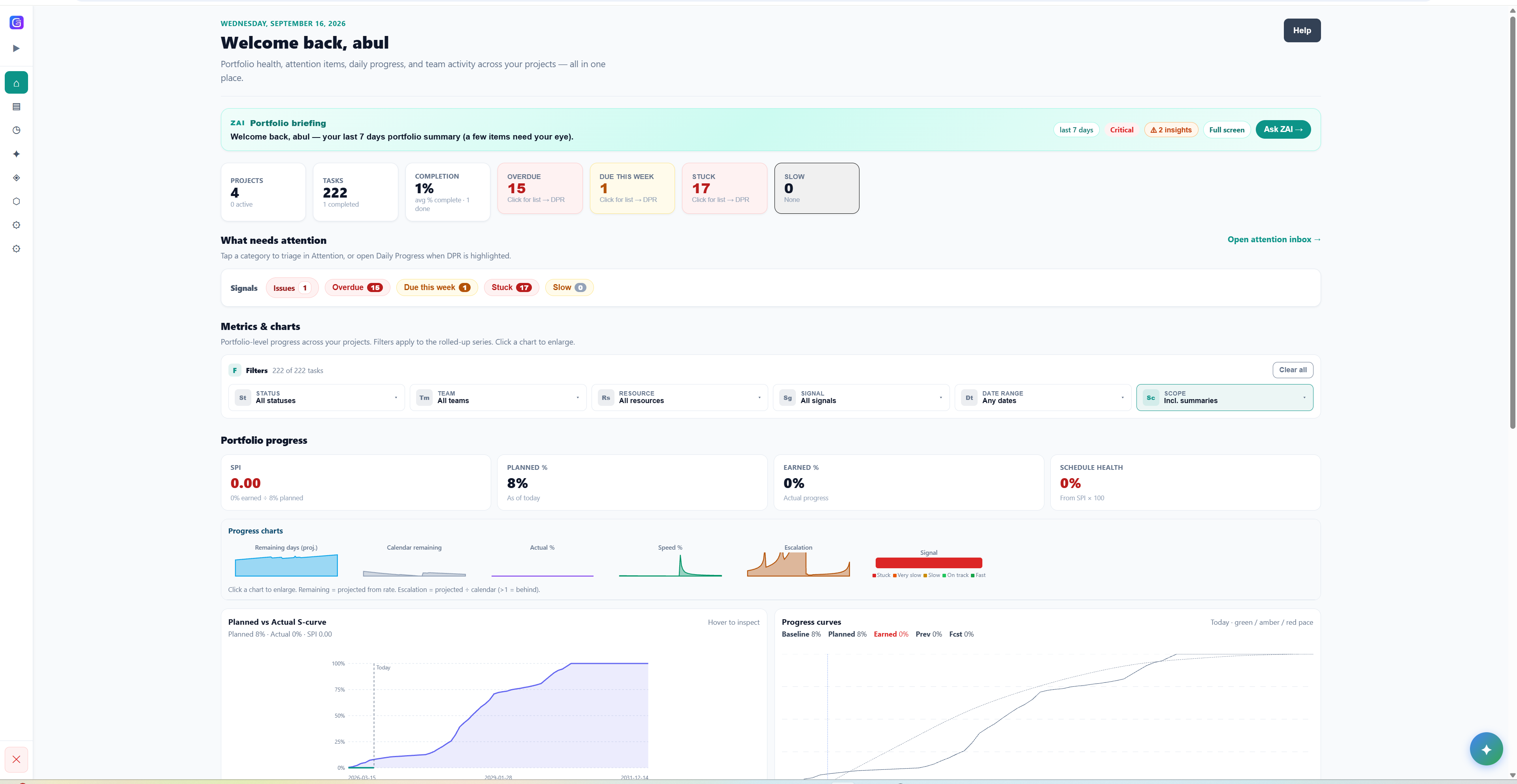
Control Tower

Every project. One live picture.

Dashboards and a multi-project inbox — escalations, assignments, mentions — so PMs and leadership see status without chasing it.

  • Schedule health, risks, and progress at a glance
  • Execution signals: behind, blocked, or on track
  • Views tuned for PMs, site engineers, leadership, and clients
See all capabilities →
Gantivity construction project management dashboard with schedule health, risks, and progress

Built for the people who actually run the job

Site engineers

A daily field workflow that takes minutes from a phone: tasks, notes, percent progress, and raise-issue from the work face — no forms, no re-keying.

Daily progress reports →

Project managers & planners

A live Gantt with critical path, execution signals, delay prediction, and AI reports — the control cycle runs daily instead of monthly.

Smart Gantt software →

Leadership, owners & PMOs

Dashboards, a multi-project inbox, and AI-generated status without chasing anyone — portfolio-level project controls on live data.

Project controls software →

Fragmented stack vs unified platform

The typical mid-size contractor runs something like: a desktop scheduling tool operated by one specialist, WhatsApp groups per site, Excel for the issue log and the progress tracker, email for escalations, and PowerPoint for the monthly report. Every handoff between those tools is manual, and every manual handoff is a place where information dies.

The costs are predictable. Progress data arrives late and unstructured, so the schedule is updated monthly at best. Issues raised in chat get buried within hours. Nobody can reconstruct what was reported on a given day when a dispute arises. And the person who understands the schedule becomes a bottleneck for everyone who needs an answer from it.

A unified platform inverts this: one schedule as the backbone, with progress, issues, messages, and reports all reading from and writing to it. The practical differences:

  • One source of truth. The Gantt the PM plans on is the task list the site engineer updates and the dataset the owner's report is generated from.
  • Structured data by default. A DPR entry is queryable history, not a photo of a diary page. An issue is a tracked record with severity and an escalation clock, not a message scrolling out of view.
  • No reconciliation tax. Nobody spends Friday transcribing site updates into the schedule and the schedule into slides.
  • Answers on demand. ZAI and AI reports mean "what's the status?" costs seconds, not a meeting.

Who Gantivity is for

General contractors get schedule-linked visibility over their own teams and subcontractors, with early warning on the driving path. Owners and developers get current, defensible status without operating the tool themselves. Subcontractors get clarity on when fronts will be ready and a timestamped record of obstructions. Enterprise PMOs get portfolio-level dashboards and consistent controls across projects — more on that in project controls software.

Teams comparing us against incumbent planning tools should read Gantivity vs Microsoft Project and Gantivity vs Primavera P6. For rollout and adoption on site, see construction site training — the short version is that the field workflow is simple enough that training is measured in minutes. Practical guides live on the blog, including our daily progress report template for construction.

Gantivity is built by DashFlow Solutions and is currently in early access with design partners — see pricing or contact us to apply.

Construction PM software: common questions

What is construction project management software?
Construction project management software helps teams plan, execute, and control building and infrastructure projects. A complete platform covers scheduling with dependencies and critical path, daily progress reporting from site, issue and escalation management, document and communication flows, and reporting for owners and leadership — in one connected system rather than separate tools.
What makes Gantivity different from other construction PM tools?
Gantivity is AI-native rather than AI-added: schedules are generated from plain-language scope in Studio, delay prediction runs on live field data, ZAI answers project questions in-channel, and reports are written by AI from the live schedule. The schedule is the backbone of the whole product — daily progress, issues, and messaging all connect back to it.
Does Gantivity replace scheduling tools, site diaries, and chat apps?
For most teams, yes. Gantivity combines CPM scheduling with Gantt and Kanban views, a structured daily progress report workflow, an issues register with auto-escalation, and project controls messaging with the ZAI copilot — the jobs typically split across a scheduling tool, a paper or WhatsApp site diary, a spreadsheet issue log, and a generic chat app.
Who is Gantivity for?
General contractors, owners and developers, subcontractors, and enterprise PMOs running construction and infrastructure projects. Site engineers use the daily progress workflow from the field, project managers run the schedule and issues, and leadership and clients follow dashboards and AI reports.
Is Gantivity difficult to roll out to site teams?
No. The field workflow is deliberately minimal: a site engineer opens their tasks, records notes and percent progress, and raises an issue if something is blocking. Most site users are productive on day one, and ZAI is available in-channel to answer questions. We also support onboarding directly during early access.
How much does Gantivity cost?
Gantivity is currently in an early access program with design partners, with custom arrangements for teams who co-design the product. Per-user Team and Enterprise plans are coming as the platform scales. See the pricing page or contact us for details.

Replace the fragmented stack with one live system

Early access is open for construction, infrastructure, and enterprise teams. Design partners get dedicated onboarding and direct input into the roadmap.